
ImageBatch Pro
Shrink a whole folder of photos without uploading a single one
Batch convert and shrink JPEG, PNG, WebP and BMP images on your PC. Originals untouched, nothing uploaded.
What it does
ImageBatch Pro converts whole folders of images to WebP, JPEG or PNG in one run, on your own PC. Pick a preset (Fast, Balanced or Maximum compression), adjust the quality, and optionally cap the width and height. Your originals are never changed and existing files are never overwritten: results go to their own folder with a CSV report of every file. Camera rotation is corrected, transparency is kept, and GPS and camera details are removed by default. It works fully offline, with no upload, no account, no ads and no telemetry. Not in 1.0: GIF, TIFF, HEIC and RAW input, animated images, watermarks and cropping.
Screenshots

Drop images or whole folders, or use Add images / Add folder. 
The queue shows the format, dimensions and size of every image before converting. 
Options: WebP, JPEG or PNG, a preset, quality and an optional maximum size. 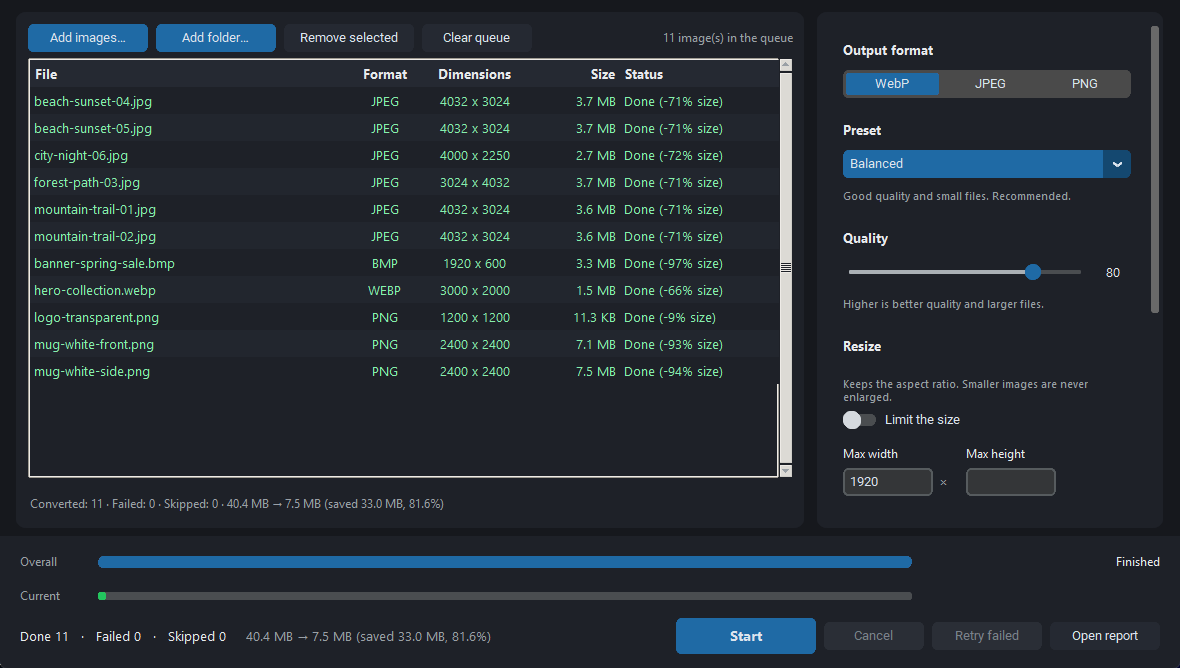
A finished batch with each file's saving. Sample run on synthetic test images: your savings depend on your photos. 
Select a file to see where its result was saved. Originals are never changed.
The problem it solves
Photos and screenshots are too large for websites, shops and messengers, and online converters mean uploading private images one at a time.
Who it is for
Online sellers, bloggers, web developers and anyone who prepares batches of images for the web.
Key features
- Converts JPEG, PNG, WebP and BMP to WebP, JPEG or PNG
- Presets: Fast, Balanced (recommended), Maximum compression; adjustable quality
- Optional maximum width and height (aspect ratio kept, never enlarged)
- Drag and drop files and whole folders
- GPS and camera details removed by default; rotation corrected, transparency kept
- Originals never changed, existing files never overwritten; CSV report of every file
- Fully offline: no upload, no account, no ads, no telemetry
More in this category
Follow AGI TOOLS on Telegram
The store will open in the Telegram bot first. Today it is a closed preview with no sales.